
iPhone, iPad and other IOS devices
View: 1-1 of 1 in total | Show 10
How to setup Khoosys Mail on your iPhone
How to setup Khoosys Mail on your iPhone
View: 1-1 of 1 in total | Show 10
Incoming Email
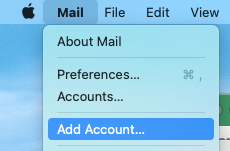
On a Mac, go to Mail, Add Account:
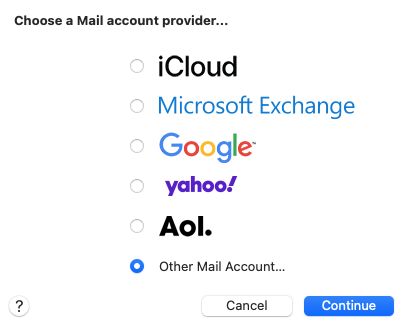
Choose "Other Mail Account...."
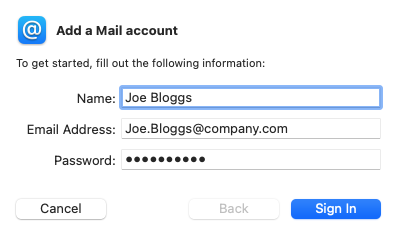
Fill in your account details
Add in mail.overssl.net to the incoming and outgoing mail server
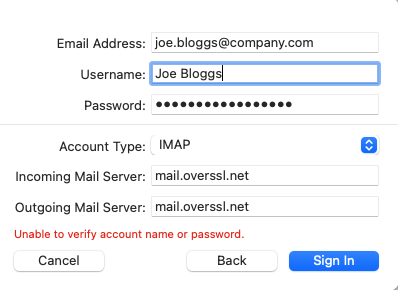
Click sign in and the account will add to your mail account.
Incoming Email
| Server Type: | IMAP (or IMAPv4) | ||
|
IMAP Server:
|
mail.overssl.net | ||
| IMAP Server Port: | 993 | ||
| Use SSL: | Yes | ||
| IMAP Username: | name@youremailaddress.com | ||
| IMAP Password: | Your email password | ||
| Prefix | INBOX (not often requested) |
Outgoing Email (SMTP Server)
|
SMTP Server:
|
mail.overssl.net | ||
| SMTP Server Port: | 465 | ||
| Use SSL: | Yes | ||
| Use Authentication | Yes | ||
| SMTP Username: | name@youremailaddress.com | ||
| IMAP Password: | Your email password |